Orkut profile can be used for varity of purposes both by owner and third person, anyone can easly extract yours information if you will not follow proper privacy feature, so it is necessay for you to know all below privacy feature to protect yours profile content on Orkut.
Remove Yourself From Google Search Results
Many few orkut users are aware of this fact that orkut profile can be indexed in google search very easily, and anyone can find you just entering few details about you in google search .Now if you have decided to hide yourself from search rsults then follow below instruction
- To hide yours profile from Search Engine Go to Setting Privacy Tab and Select Hide information from orkut in google search results.
Enable or Disable Photo Tagging In Orkut
Photo tagging is now used by orkuters for fun users are uploading funny images and tagging them in orkut album to insult his/her friends .So if you are one among them then you can disable this from your setting here’s how
- Go to Setting Select Privacy Tab and Unmark yes to Disable Photo tagging
Allow selected people to Sent Friend Request
In orkut anyone can send you Friend request , if you only want to receive friend request from your friends then select
friend requests are allowed to be sent by either friends of friends or people who know my email address (required default).
Allow content to be accessed by Friends or everyone
Few months back anyone can easily read anyone scraps and retrive his/her information but now this is not possible if you have selected yours privacy to
Only my friends , this setting will help you protect your scrapbook albums , testimonial and Videos from strangers in orkut .
Hide Orkut Photos Album From Friends
How many of you want to hide some private photos from there friends ,I think among thousand many says yes i wana hide some pictures from some of my friends ,and this is possible also just a simple orkut setting and you are done ,Here’s how
- Go to Orkut Setting Privacy Tab and find albums setting at bottom of orkut pages under allow content to be accessed by and select choose per album
 Clickon edit to reset album setting, If you wants to hide album from yours all friends click cross mark in groups as shown in below image.
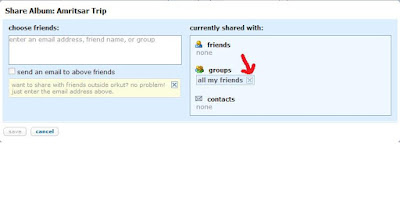
If you want to share your albums with few of yours friends then you can use choose friends feature ( Invitation send using Email ) to share your albums inside as well as outside the orkut .


